Futuri Light Italic Font Preview
Rendered live in your browser



Futuri Light Italic Font Details
| Format | TTF OpenType File Format |
| Style | Italic |
| Year | 1992 |
| Copyright | Copyright 986-1992 SWFTE International, Ltd. All rights reserved |
| Version | Rev. 002.02 |
| File name | futuri-light-italic.ttf |
| File size | 49 KB |
| Licence | Personal use · check for commercial |
Design Context for Futuri Light Typeface
Futuri Light has a distinctly futuristic character, with geometric precision and clean angles that feel at home in technology, gaming, and sci-fi contexts. The slanted form adds forward momentum and visual energy. The delicate stroke weight brings airiness and refinement to layouts.
Well-suited to game UI, sci-fi branding, app interfaces, and technology product design.
Dating back to 1992, this typeface is available in TrueType (TTF) format.
Font Pairing: Pairs well with a humanist sans-serif for body copy — the contrast between mechanical precision and organic warmth creates a compelling typographic dynamic.
Pro Tip: Use Futuri Light in combination with a neutral sans for body text. Let it define the brand voice in headlines while keeping reading comfortable elsewhere.
Futuri Light Italic Test Drive
Type to preview
Futuri Light Italic Character Map
Complete glyph index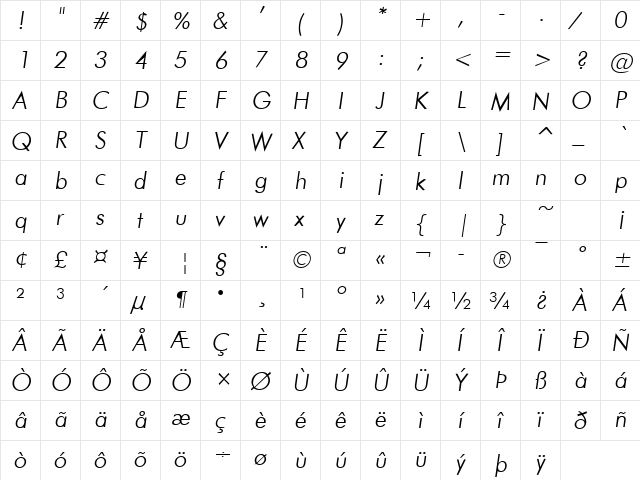
Download Futuri Light Italic
- File name
- futuri-light-italic.ttf
- File size
- 49 KB
- Format
- TrueType (TTF)
- Version
- Rev. 002.02
- Licence
- Personal use · check for commercial
Share Futuri Light Italic Free Font
| Short URL | |
| Permalink URL | |
| Standard HREF Link Code | |
QR Code Link  | |
Copied to clipboard! |
|