VTC-KomikaHeadLinerOne Bold Italic Font Preview
Rendered live in your browser



VTC-KomikaHeadLinerOne Bold Italic Font Details
| Format | TTF OpenType File Format |
| Style | Bold Italic |
| Foundry | WolfBainx - Larry E. Yerkes, Vigilante Typeface Corporation. |
| Designer | WolfBainx - Larry E. Yerkes, Vigilante Typeface Corporation. |
| Year | 2010 |
| Copyright | Copyright 010, WolfBainx - Larry E. Yerkes, Vigilante Typeface Corporation and Associates All rights reserved. This Font is free for personal non-commercial use and not to be used for commercial purposes without permission of the copyright holder or by pu |
| Version | Version 1.000 2010 initial release |
| File name | vtc-komikaheadlinerone-bold-italic.ttf |
| File size | 55 KB |
| Licence | Copyright 頲010, WolfBainx - Larry E. Yerkes, Vigilante Typeface Corporation and Associates All rights reserved. This font should not be distributed without a License and is not to be modified in any way.This includes Converting into Vectors,Stitchi |
Design Context for VTC-KomikaHeadLinerOne Typeface
VTC-KomikaHeadLinerOne is a composed and adaptable typeface that performs quietly and consistently across a wide range of design contexts. The slanted form adds forward momentum and visual energy. The heavy weight commands attention and anchors typographic hierarchies.
A dependable choice for both digital and print design across branding, editorial, and UI contexts.
First published in 2010, this typeface is available in TrueType (TTF) format.
Font Pairing: Pairs effectively with both display and text companions — its neutral character adapts well to most typographic systems.
Pro Tip: Try VTC-KomikaHeadLinerOne for annotation and caption copy alongside an upright companion — the contrast in angle creates a dynamic but ordered typographic system.
VTC-KomikaHeadLinerOne Bold Italic Test Drive
Type to preview
VTC-KomikaHeadLinerOne Bold Italic Character Map
Complete glyph index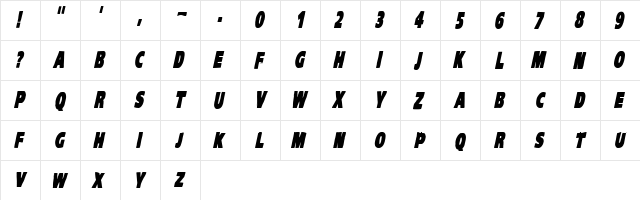
Download VTC-KomikaHeadLinerOne Bold Italic
- File name
- vtc-komikaheadlinerone-bold-italic.ttf
- File size
- 55 KB
- Format
- TrueType (TTF)
- Version
- Version 1.000 2010 initial release
- Licence
- Personal use · check for commercial
Share VTC-KomikaHeadLinerOne Bold Italic Free Font
| Short URL | |
| Permalink URL | |
| Standard HREF Link Code | |
QR Code Link  | |
Copied to clipboard! |
|