Trade Gothic LT Com Bold Condensed No. 20 Oblique Font Preview
Rendered live in your browser



Trade Gothic LT Com Bold Condensed No. 20 Oblique Font Details
| Format | TTF OpenType File Format |
| Style | Bold Condensed No. 20 Oblique |
| Foundry | Linotype GmbH |
| Designer | Jackson Burke |
| Year | 2006 |
| Copyright | Part of the digitally encoded machine readable outline data for producing the Typefaces provided is copyrighted 002 - 2006 Linotype GmbH,https://www.linotype.com. All rights reserved. This software is the property of Linotype GmbH, and may not be reproduced, mod |
| Version | Version 1.02;2006 |
| File name | trade-gothic-lt-com-bold-condensed-no-20-oblique.ttf |
| File size | 160 KB |
| Licence | NOTIFICATION OF LICENSE AGREEMENTYou have obtained this typeface software either directly from Linotype GmbH or together with software distributed by one of Linotype's licensees.This software is a valuable asset of Linotype GmbH. Unless you have entered i |
Design Context for Trade Gothic LT Com Typeface
Trade Gothic LT Com takes a clean, functional approach — its unadorned letterforms prioritise legibility and work reliably across screen and print environments. Its italic angle brings a sense of urgency and motion to the letterforms. The heavy weight commands attention and anchors typographic hierarchies. The condensed width makes it efficient for tight spaces without sacrificing legibility.
Well-suited to navigation labels, product packaging, and anywhere legibility at scale is essential.
Dating back to 2006, this typeface is available in TrueType (TTF) format.
Font Pairing: Use Trade Gothic LT Com for headlines alongside a lighter-weight sans or serif for body copy to establish clear visual hierarchy.
Pro Tip: Use Trade Gothic LT Com tightly set in headlines and banners — its condensed proportions make it ideal for maximum impact in minimum horizontal space.
Trade Gothic LT Com Bold Condensed No. 20 Oblique Test Drive
Type to preview
Trade Gothic LT Com Bold Condensed No. 20 Oblique Character Map
Complete glyph index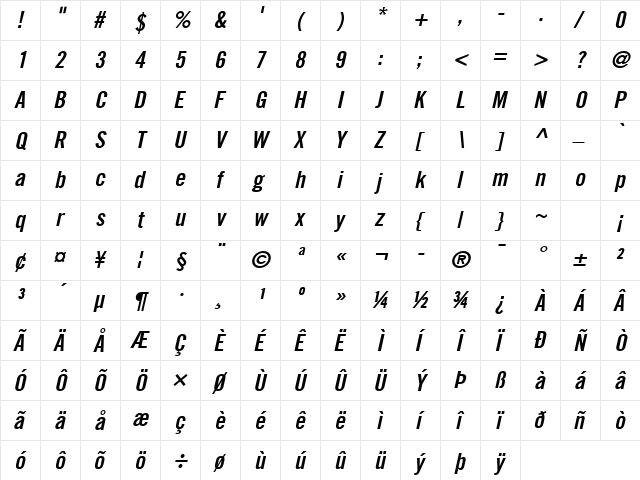
Download Trade Gothic LT Com Bold Condensed No. 20 Oblique
- File name
- trade-gothic-lt-com-bold-condensed-no-20-oblique.ttf
- File size
- 160 KB
- Format
- TrueType (TTF)
- Version
- Version 1.02;2006
- Licence
- Personal use · check for commercial
Share Trade Gothic LT Com Bold Condensed No. 20 Oblique Free Font
| Short URL | |
| Permalink URL | |
| Standard HREF Link Code | |
QR Code Link  | |
Copied to clipboard! |
|