LCDMono2 Light Font Preview
Rendered live in your browser



LCDMono2 Light Font Details
| Format | TTF OpenType File Format |
| Style | Light |
| Year | 1999 |
| Copyright | Copyright 999 by Samuel Reynolds. All rights reserved. |
| Version | Altsys Fontographer 4.0.4 1999/10/30 |
| File name | lcdmono2-light.ttf |
| File size | 26 KB |
| Licence | Personal use · check for commercial |
Design Context for LCDMono2 Typeface
LCDMono2 uses fixed-width spacing throughout, giving it the structured, systematic character associated with coding environments and technical documentation. The delicate stroke weight brings airiness and refinement to layouts.
Well-suited to data-driven dashboards, coding tutorials, and any design that wants to reference the world of programming.
Originally released in 1999, this typeface is available in TrueType (TTF) format.
Font Pairing: Pairs well with a humanist sans-serif for body copy — the contrast between mechanical precision and organic warmth creates a compelling typographic dynamic.
Pro Tip: Use LCDMono2 with slightly increased line-height for extended reading — fixed-width spacing can feel dense in longer passages without extra breathing room.
LCDMono2 Light Test Drive
Type to preview
LCDMono2 Light Character Map
Complete glyph index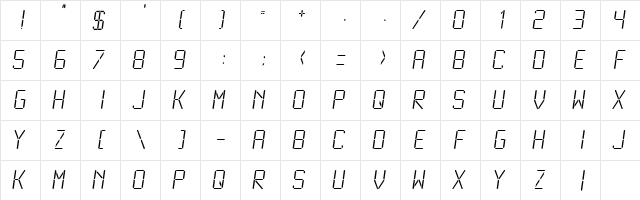
Download LCDMono2 Light
- File name
- lcdmono2-light.ttf
- File size
- 26 KB
- Format
- TrueType (TTF)
- Version
- Altsys Fontographer 4.0.4 1999/10/30
- Licence
- Personal use · check for commercial
Share LCDMono2 Light Free Font
| Short URL | |
| Permalink URL | |
| Standard HREF Link Code | |
QR Code Link  | |
Copied to clipboard! |
|