JohnSansCond Text Pro Bold Italic Font Preview
Rendered live in your browser



JohnSansCond Text Pro Bold Italic Font Details
| Format | OTF OpenType File Format |
| Style | Bold Italic |
| Foundry | Frantisek Storm,https://www.stormtype.com |
| Designer | Frantisek Storm |
| Year | 2001 |
| Copyright | Copyright (c) Frantisek Storm,https://www.stormtype.com, 2001. All rights reserved. |
| Version | Version 1.000;PS 001.000;hotconv 1.0.38 |
| File name | johnsanscond-text-pro-bold-italic-opentype.otf |
| File size | 95 KB |
| Licence | Storm Type Foundry END USER LICENSE AGREEMENTThis is a contract between you and Storm Type Foundry(STF). If you have any questions pertaining to the license agreement, please contact STF at:Tel.: +420 2 3333 75 11, E-mail: [email protected] Type Foun |
Design Context for JohnSansCond Text Pro Typeface
JohnSansCond Text Pro takes a measured approach to typography — its balanced proportions and neutral character make it a reliable workhorse for both digital and print work. Its italic angle brings a sense of urgency and motion to the letterforms. Its bold stroke weight gives it real presence on the page. Its narrow stance lets it pack a punch even in space-constrained designs.
Well-suited to newspaper headlines, data-dense UI, packaging copy, and anywhere horizontal space is limited.
Originally released in 2001, this typeface is available in OpenType (OTF) format.
Font Pairing: Pairs effectively with both display and text companions — its neutral character adapts well to most typographic systems.
Pro Tip: Try JohnSansCond Text Pro for annotation and caption copy alongside an upright companion — the contrast in angle creates a dynamic but ordered typographic system.
JohnSansCond Text Pro Bold Italic Test Drive
Type to preview
JohnSansCond Text Pro Bold Italic Character Map
Complete glyph index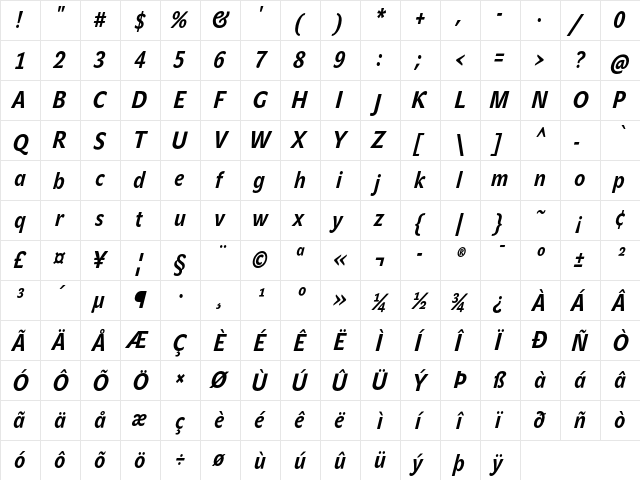
Download JohnSansCond Text Pro Bold Italic
- File name
- johnsanscond-text-pro-bold-italic-opentype.otf
- File size
- 95 KB
- Format
- OpenType (OTF)
- Version
- Version 1.000;PS 001.000;hotconv 1.0.38
- Licence
- Personal use · check for commercial
Share JohnSansCond Text Pro Bold Italic Free Font
| Short URL | |
| Permalink URL | |
| Standard HREF Link Code | |
QR Code Link  | |
Copied to clipboard! |
|