JohnSansCond Med Pro Italic Font Preview
Rendered live in your browser



JohnSansCond Med Pro Italic Font Details
| Format | OTF OpenType File Format |
| Style | Italic |
| Foundry | Frantisek Storm,https://www.stormtype.com |
| Designer | Frantisek Storm |
| Year | 2001 |
| Copyright | Copyright (c) Frantisek Storm,https://www.stormtype.com, 2001. All rights reserved. |
| Version | Version 1.000;PS 001.000;hotconv 1.0.38 |
| File name | johnsanscond-med-pro-italic-opentype.otf |
| File size | 95 KB |
| Licence | Storm Type Foundry END USER LICENSE AGREEMENTThis is a contract between you and Storm Type Foundry(STF). If you have any questions pertaining to the license agreement, please contact STF at:Tel.: +420 2 3333 75 11, E-mail: [email protected] Type Foun |
Design Context for JohnSansCond Med Pro Typeface
JohnSansCond Med Pro offers clean, dependable letterforms without strong stylistic allegiance, making it a practical choice for designers who need flexibility. The dynamic lean of this cut emphasises speed and emphasis in any layout. Its narrow stance lets it pack a punch even in space-constrained designs.
Well-suited to newspaper headlines, data-dense UI, packaging copy, and anywhere horizontal space is limited.
Originally released in 2001, this typeface is available in OpenType (OTF) format.
Font Pairing: Pairs effectively with both display and text companions — its neutral character adapts well to most typographic systems.
Pro Tip: Try JohnSansCond Med Pro for annotation and caption copy alongside an upright companion — the contrast in angle creates a dynamic but ordered typographic system.
JohnSansCond Med Pro Italic Test Drive
Type to preview
JohnSansCond Med Pro Italic Character Map
Complete glyph index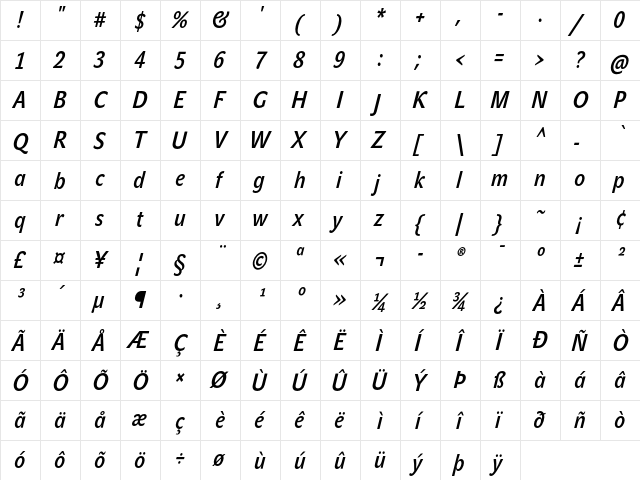
Download JohnSansCond Med Pro Italic
- File name
- johnsanscond-med-pro-italic-opentype.otf
- File size
- 95 KB
- Format
- OpenType (OTF)
- Version
- Version 1.000;PS 001.000;hotconv 1.0.38
- Licence
- Personal use · check for commercial
Share JohnSansCond Med Pro Italic Free Font
| Short URL | |
| Permalink URL | |
| Standard HREF Link Code | |
QR Code Link  | |
Copied to clipboard! |
|