ITC Avant Garde Gothic Std Extra Light Condensed Oblique Font Preview
Rendered live in your browser



ITC Avant Garde Gothic Std Extra Light Condensed Oblique Font Details
| Format | OTF OpenType File Format |
| Style | Extra Light Condensed Oblique |
| Designer | Herb Lubalin, Tom Carnase, Ed Benguiat, Adobe Type Staff |
| Year | 2001 |
| Copyright | Copyright 993, 1994, 2001 Adobe Systems Incorporated. All Rights Reserved. |
| Version | OTF 1.018;PS 001.001;Core 1.0.31;makeotf.lib1.4.1585 |
| File name | itcavantgardestd-xltcnobl-opentype.otf |
| File size | 30 KB |
| Licence | Personal use · check for commercial |
Design Context for ITC Avant Garde Gothic Std Typeface
ITC Avant Garde Gothic Std has the quiet confidence of well-executed sans-serif typography: versatile, unobtrusive, and dependable at any size. The slanted form adds forward momentum and visual energy. The delicate stroke weight brings airiness and refinement to layouts. Its narrow stance lets it pack a punch even in space-constrained designs.
A natural fit for high-end product packaging, luxury brand identities, and refined web typography.
First published in 1994, this typeface is available in OpenType (OTF) format.
Font Pairing: Pair ITC Avant Garde Gothic Std with a medium or bold serif for headlines — the weight contrast creates an elegant, high-end feel.
Pro Tip: Use ITC Avant Garde Gothic Std tightly set in headlines and banners — its condensed proportions make it ideal for maximum impact in minimum horizontal space.
ITC Avant Garde Gothic Std Extra Light Condensed Oblique Test Drive
Type to preview
ITC Avant Garde Gothic Std Extra Light Condensed Oblique Character Map
Complete glyph index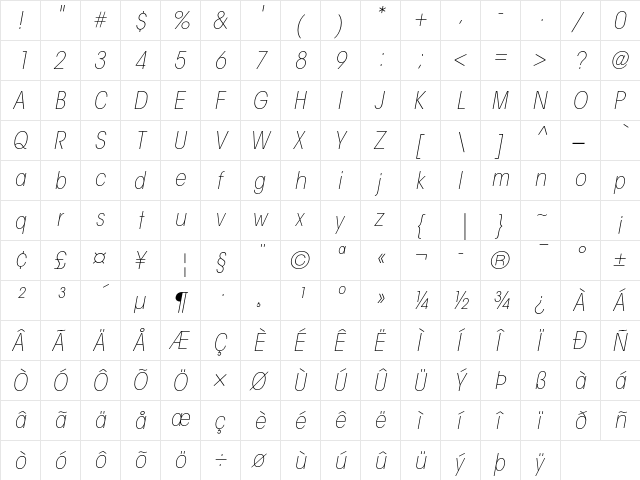
Download ITC Avant Garde Gothic Std Extra Light Condensed Oblique
- File name
- itcavantgardestd-xltcnobl-opentype.otf
- File size
- 30 KB
- Format
- OpenType (OTF)
- Version
- OTF 1.018;PS 001.001;Core 1.0.31;makeotf.lib1.4.1585
- Licence
- Personal use · check for commercial
Share ITC Avant Garde Gothic Std Extra Light Condensed Oblique Free Font
| Short URL | |
| Permalink URL | |
| Standard HREF Link Code | |
QR Code Link  | |
Copied to clipboard! |
|