Helvetica Neue LT Com 63 Medium Extended Oblique Font Preview
Rendered live in your browser



Helvetica Neue LT Com 63 Medium Extended Oblique Font Details
| Format | TTF OpenType File Format |
| Style | 63 Medium Extended Oblique |
| Foundry | Linotype GmbH |
| Designer | Linotype Design Studio |
| Year | 2006 |
| Copyright | Part of the digitally encoded machine readable outline data for producing the Typefaces provided is copyrighted 006 Linotype GmbH,https://www.linotype.com. All rights reserved. This software is the property of Linotype GmbH, and may not be reproduced, modified, |
| Version | Version 1.00; 2006 |
| File name | helvetica-neue-lt-com-63-medium-extended-oblique.ttf |
| File size | 89 KB |
| Licence | NOTIFICATION OF LICENSE AGREEMENTYou have obtained this typeface software either directly from Linotype GmbH or together with software distributed by one of Linotype's licensees.This software is a valuable asset of Linotype GmbH. Unless you have entered i |
Design Context for Helvetica Neue LT Com Typeface
Helvetica Neue LT Com is a composed and adaptable typeface that performs quietly and consistently across a wide range of design contexts. The slanted form adds forward momentum and visual energy. Its slender proportions lend an understated elegance to any composition.
A dependable choice for both digital and print design across branding, editorial, and UI contexts.
Originally released in 2006, this typeface is available in TrueType (TTF) format.
Font Pairing: Pairs effectively with both display and text companions — its neutral character adapts well to most typographic systems.
Pro Tip: Try Helvetica Neue LT Com for annotation and caption copy alongside an upright companion — the contrast in angle creates a dynamic but ordered typographic system.
Helvetica Neue LT Com 63 Medium Extended Oblique Test Drive
Type to preview
Helvetica Neue LT Com 63 Medium Extended Oblique Character Map
Complete glyph index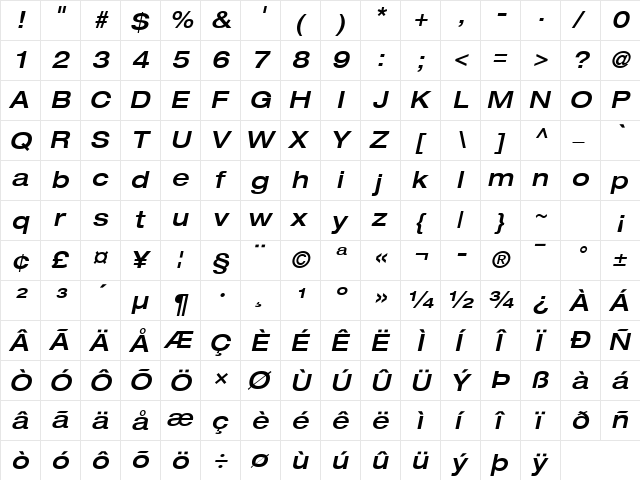
Download Helvetica Neue LT Com 63 Medium Extended Oblique
- File name
- helvetica-neue-lt-com-63-medium-extended-oblique.ttf
- File size
- 89 KB
- Format
- TrueType (TTF)
- Version
- Version 1.00; 2006
- Licence
- Personal use · check for commercial
Share Helvetica Neue LT Com 63 Medium Extended Oblique Free Font
| Short URL | |
| Permalink URL | |
| Standard HREF Link Code | |
QR Code Link  | |
Copied to clipboard! |
|